How to Calculate Macros for Weight Loss, From BMR Into Grams
Learning how to calculate macros takes five steps and some multiplication. You estimate BMR, apply an activity factor, set a goal, then turn calories into grams. Every step here uses the same equations as the calculator. Three worked profiles print each intermediate number.
Use this page to learn the method or to check a result. The first example shows how to calculate macros for weight loss, from BMR to grams. When you want the answer fast, the macro calculator runs all five steps and prints each one. Tracking and strategy have their own guides, linked below.
What Are Macros and Why Calculate Them?
Macros, short for macronutrients, are the protein, carbohydrate and fat in your food. Protein and carbohydrate each provide about 4 kcal per gram, and fat provides about 9 kcal per gram, so the three together make up your daily calories.
The method means converting one calorie target into three gram targets. The what are macros guide covers the types, food sources and typical ranges. This page covers only the arithmetic.
How to Calculate Macros in Five Steps
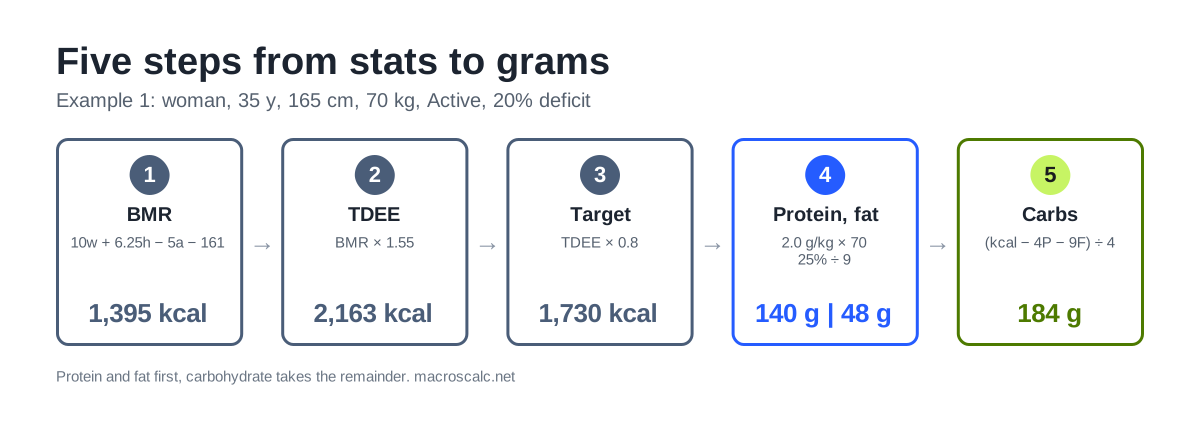
How to calculate macros is an ordered process, so the order matters. Each step feeds the next: resting energy, then daily energy, then a calorie target, then protein and fat, then carbohydrate. Protein and fat are set first from body weight and calories, and carbohydrate takes whatever calories remain.
Two shortcuts exist in the method. If you already know your calorie target, start at step 4. If you know your body fat percentage, use the lean-mass equation in step 1. The five steps below use grams, kilograms and centimetres, and the worked examples later show the pound conversions.
Step 1 of How to Calculate Macros: Estimate Your BMR
Basal metabolic rate is the energy your body uses at rest. The Mifflin-St Jeor equation predicts it from weight w in kilograms, height h in centimetres, age a in years and a sex term s. The sex term is +5 for men and −161 for women.
BMR = 10w + 6.25h − 5a + sWhen body fat is known, the Katch-McArdle equation uses lean body mass (LBM) in kilograms instead, and the calculator switches to it automatically.
To compare Mifflin-St Jeor with the Katch-McArdle and other equations, see BMR equations.
BMR = 370 + 21.6 × LBMThe BMR and TDEE page covers what these numbers mean and how accurate they are.
Step 2 of How to Calculate Macros: Apply the Activity Factor
Multiply BMR by the factor for your average week to get total daily energy expenditure (TDEE), your estimated maintenance calories. The next section lists every factor with the calculator’s own wording.
TDEE = BMR × fStep 3 of How to Calculate Macros: Set the Goal Adjustment
Maintenance uses TDEE as the target. A fat-loss goal subtracts a share of it, and a gain goal adds one. A 20% deficit gives 0.8 × TDEE and a 10% surplus gives 1.1 × TDEE. The calculator page sets the goal as a weekly rate instead. A loss of 0.5 lb a week is about 250 kcal a day, 1 lb about 500 and 1.5 lb about 750. The worked examples below use the percentage method so the arithmetic is easy to follow. With the 1 lb a week preset, Example 1 becomes 1,663 kcal, or 140 g protein, 172 g carbohydrate and 46 g fat.
The calculator never builds a target below 1,200 kcal for women or 1,500 kcal for men. The macros for weight loss guide explains how large a deficit to choose and why.
Step 4 of How to Calculate Macros: Set Protein and Fat
Protein comes from body weight, usually 1.6 to 2.2 g per kg, with the higher end used in a deficit. Evidence from resistance-training studies puts the gain in muscle at a plateau near 1.6 g per kg, which is why 1.6 is the maintenance default. Fat is set as a share of calories, commonly 25% to 30%, and kept above a floor of about 0.6 g per kg.
Convert both to grams with the Atwater factors: protein and carbohydrate give 4 kcal per gram, and fat gives 9.
protein_g = g_per_kg × weight_kg
fat_g = (share × calories) / 9
Step 5 of How to Calculate Macros: Fill the Rest With Carbs
Subtract the calories used by protein and fat from the target, then divide what is left by 4. Carbohydrate is the flexible macro, so it absorbs every change in calories.
carbs_g = (calories − 4 × protein_g − 9 × fat_g) / 4If the result is zero or negative, the target is too low for the protein and fat chosen. Raise calories or lower the fat share before going further.
How to Calculate Macros: Activity Levels and Multipliers
For the calculation, the engine uses seven factors, and six of them appear in the calculator’s activity dropdown with the wording below. The first row, 1.0, is BMR with no activity added and is not a selectable level. Any other value is BMR times that factor.
Factor | Level (calculator wording) |
|---|---|
1.0 | BMR only (no activity; engine baseline, not in the dropdown) |
1.2 | Sedentary: little to no exercise |
1.375 | Light: exercise 1 to 3 times a week |
1.465 | Moderate: exercise 4 to 5 times a week (default) |
1.55 | Active: daily exercise or 3 to 4 intense sessions |
1.725 | Very Active: intense exercise 6 to 7 times a week |
1.9 | Extra Active: intense physical job or 2 sessions a day |
Choose the level that matches your average week, not your best one, and take the lower level if you sit between two. A one-step slip changes TDEE by roughly 120 to 360 kcal for a 70 kg adult, which is enough to shift a weekly weight trend. The BMR and TDEE page shows the same six levels with real calories for two profiles.
The factor is an estimate of everything outside BMR: exercise, daily movement, work and digestion. It cannot be measured from a form, so recheck it against your weight trend after two to three weeks.
Worked Examples: Three Profiles
The method is easiest to see in cases, and these are the same three cases shown on the home page, so the guide and the calculator cannot disagree. Each table prints every intermediate number, carried unrounded and rounded to the nearest unit at the end.
The first is a fat-loss case from stats, the second a muscle-gain case that uses body fat, and the third a case where calories are already known. Together they cover all three entry routes.
Example 1: Calculate My Macros for Weight Loss (Woman, 70 kg)
A 35-year-old woman, 165 cm, 70 kg, activity Active (1.55), goal fat loss with a 20% deficit.
Step | Calculation | Result |
|---|---|---|
BMR | 10 × 70 + 6.25 × 165 − 5 × 35 − 161 | 1,395 kcal |
TDEE | 1,395.25 × 1.55 | 2,163 kcal |
Target | 2,162.64 × 0.8 | 1,730 kcal |
Protein | 2.0 g/kg × 70 kg | 140 g (560 kcal) |
Fat | 25% × 1,730 ÷ 9 | 48 g (433 kcal) |
Carbs | (1,730 − 560 − 433) ÷ 4 | 184 g |
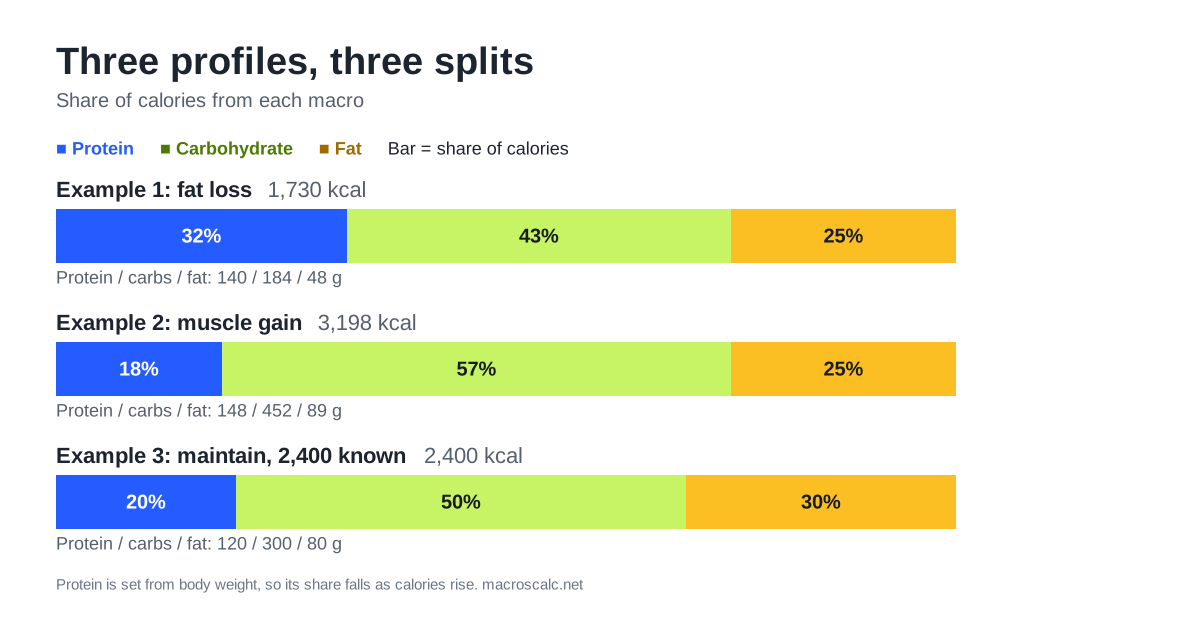
The split is 32% protein, 43% carbohydrate and 25% fat. The deficit is 433 kcal a day below maintenance, about 0.9 lb a week by the 3,500 kcal rule of thumb. Protein is high relative to calories because it is set from body weight first, which protects lean mass while eating less. Rounded grams add up to 1,728 kcal, 2 below the target, which is rounding and not an error.
Example 2: How to Calculate Macros for Muscle Gain (Man, 82 kg)
A 28-year-old man, 180 cm, 82 kg, 15% body fat, activity Active (1.55), goal gain with a 10% surplus.
Step | Calculation | Result |
|---|---|---|
Lean mass | 82 × (1 − 0.15) | 69.7 kg |
BMR (Katch-McArdle) | 370 + 21.6 × 69.7 | 1,876 kcal |
TDEE | 1,875.52 × 1.55 | 2,907 kcal |
Target | 2,907.06 × 1.1 | 3,198 kcal |
Protein | 1.8 g/kg × 82 kg | 148 g (590 kcal) |
Fat | 25% × 3,198 ÷ 9 | 89 g (799 kcal) |
Carbs | (3,198 − 590 − 799) ÷ 4 | 452 g |
The surplus is 291 kcal a day, and almost all of it lands in carbohydrate, which comes to 5.5 g per kg. Without the body fat entry, Mifflin-St Jeor would give a BMR of 1,810, so the lean-mass equation adds 66 kcal here. That is a modest difference, and it grows for people far from average body composition.
Example 3: How to Calculate Macros With Known Calories (Man, 75 kg)
A 40-year-old man, 75 kg, who already knows his maintenance is 2,400 kcal. Steps 1 to 3 are skipped.
Step | Calculation | Result |
|---|---|---|
Target | entered directly | 2,400 kcal |
Protein | 1.6 g/kg × 75 kg | 120 g (480 kcal) |
Fat | 30% × 2,400 ÷ 9 | 80 g (720 kcal) |
Carbs | (2,400 − 480 − 720) ÷ 4 | 300 g |
The split is 20% protein, 30% fat and 50% carbohydrate, with carbohydrate at 4.0 g per kg. When you enter calories yourself, the result is only as good as that figure. The number should come from a stable weight at a known intake rather than from a guess.
How to Interpret Your Numbers and Adjust
Once you know how to calculate macros, read the result from the top down. Calories come first, because they set the direction of your weight. Protein is the minimum to hit, fat is the floor to stay above, and carbohydrate is what remains. If protein works out above 35% of calories, the calculator flags it, because a low target with a high body weight leaves little room for anything else.
Treat the first result as a starting estimate. Follow it for two to three weeks, compare the average of your weekly weigh-ins with where you expected to be, and change only calories. If the trend is flat when it should be falling, trim 100 to 150 kcal from carbohydrate and recheck. Protein and fat stay put, so the adjustment is a single change you can read in the next average.
How to Calculate Macros: Choosing a Split by Goal
The three worked examples above show the pattern. A fat-loss target sets protein highest per kilogram (2.0 g/kg in Example 1) so lean mass is protected while calories are low. A gain target uses a moderate protein level (1.8 g/kg in Example 2) and leaves more calories for carbohydrate. Maintenance sits lower still (1.6 g/kg in Example 3). Carbohydrate takes whatever calories remain in every case.
Quick Reference: How to Calculate Macros by Calorie Target
The table shows the macros when the calorie target changes. A fixed protein and fat rule spreads across common calorie levels for a 70 kg woman at maintenance defaults: 1.6 g per kg protein and 30% of calories from fat.
Calories | Protein (g) | Carbs (g) | Fat (g) |
|---|---|---|---|
1,500 | 112 | 151 | 50 |
1,800 | 112 | 203 | 60 |
2,000 | 112 | 238 | 67 |
2,500 | 112 | 326 | 83 |
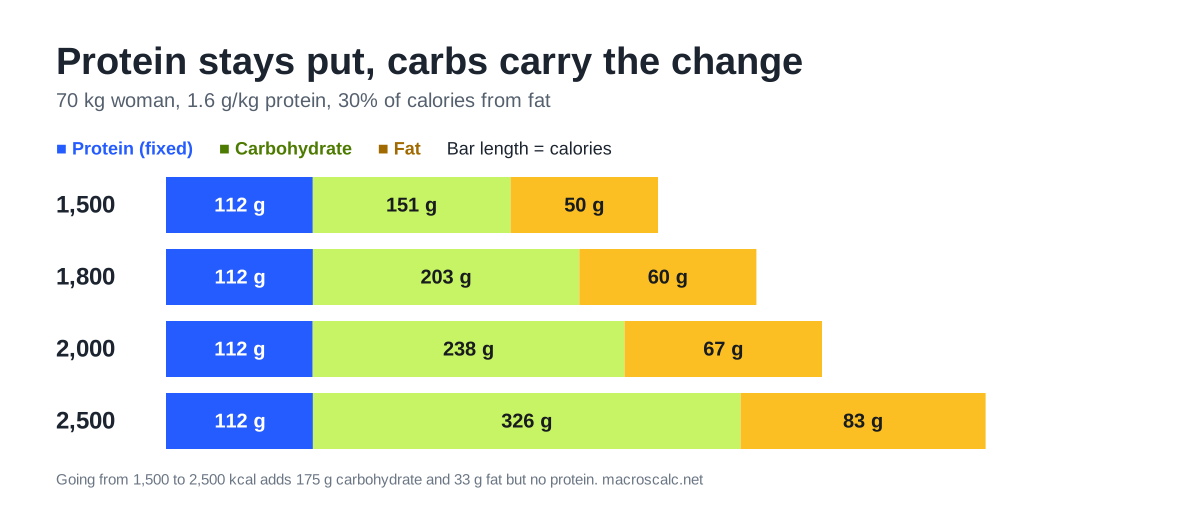
Protein stays fixed at 112 g because it follows body weight. Carbohydrate carries most of each calorie change: 1,000 kcal more adds 175 g of carbohydrate and 33 g of fat. The same logic applies to any body weight, so scale the protein row by weight and the rest follows from the target.
How to Calculate Macros by Hand or With the Calculator
Learning how to calculate macros by hand is worth it once. It shows which input moves which number, and it lets you check any calculator, including this one. How to properly calculate macros comes down to using the same equation and rounding rules every time, so keep a note of the version you used.
After that, the calculator is faster and removes arithmetic slips. Enter your stats or your own calories, pick a goal, and read the printed steps. If you are wondering how to use a macro calculator well, the main rule is to enter your real average activity and re-enter your weight when it changes. The macro calculator prints every line from BMR to grams, so a hand check takes a minute.
How to Calculate Macros in Code
The five steps fit in two short functions. The snippet below was run against all three worked examples and returns the same grams. It gives 140, 184 and 48 for Example 1, 148, 452 and 89 for Example 2, and 120, 300 and 80 for Example 3.
FACTORS = {"sedentary": 1.2, "light": 1.375, "moderate": 1.465,
           "active": 1.55, "very_active": 1.725, "extra_active": 1.9}

def bmr(sex, age, height_cm, weight_kg, body_fat=None):
    if body_fat is not None:                      # Katch-McArdle
        return 370 + 21.6 * weight_kg * (1 - body_fat)
    return 10 * weight_kg + 6.25 * height_cm - 5 * age + (5 if sex == "male" else -161)

def macros(calories, weight_kg, protein_per_kg, fat_share):
    protein = protein_per_kg * weight_kg
    fat = fat_share * calories / 9
    carbs = (calories - 4 * protein - 9 * fat) / 4
    return round(protein), round(carbs), round(fat)

# Example 1: woman, 35 y, 165 cm, 70 kg, Active, 20% deficit
tdee = bmr("female", 35, 165, 70) * FACTORS["active"]
print(round(tdee), macros(tdee * 0.8, 70, 2.0, 0.25))   # 2163 (140, 184, 48)
How to Track Your Macros Once You Have the Numbers
Calculated targets only work if you compare them with what you eat. Weigh or measure food, log each item as you go, and fill the protein target first. Then check the day’s carbohydrate and fat totals against the plan.
The how to count macros guide walks through the daily routine, raw versus cooked entries and a sample day log. Recalculate whenever your weight changes by a few kilograms or your activity shifts.
Safety and Limits
These steps are for healthy adults and give estimates, not prescriptions. The calculator stops when inputs fall outside its range and never builds a target below 1,200 kcal for women or 1,500 kcal for men.
They do not fit people under 18, pregnancy or breastfeeding, or anyone managing a medical condition or an eating disorder. A target below 800 kcal a day belongs under medical supervision, per the 2013 AHA/ACC/TOS guideline. Use a clinician’s numbers in any of those cases.
Common Calculation Mistakes
Most mistakes people make when learning the method come from one of the slips below. Sizes use the worked examples above.
Mistake | What goes wrong | Fix |
|---|---|---|
Entering pounds as kilograms | Example 1 with 154 typed as kg gives 308 g of protein instead of 140 g, and a BMR 840 kcal too high | Check the unit switch, and convert 1 lb = 0.4536 kg |
Applying the deficit to BMR | Example 1: 0.8 × 1,395 = 1,116 kcal, below the 1,200 kcal floor | Apply the goal to TDEE, not BMR |
Setting protein as a percentage | 25% of 1,500 kcal is 94 g, or 1.34 g per kg for a 70 kg woman, short of the 112 g at 1.6 g per kg | Set protein from body weight in g per kg |
Mixing up the Atwater factors | Dividing Example 1 carbohydrate calories by 9 gives 82 g instead of 184 g | Protein and carbohydrate are 4 kcal per gram, fat is 9 |
Ignoring a negative or tiny carb result | At 1,200 kcal and 100 kg with 2.0 g per kg protein, carbs fall to 25 g and protein is 67% of calories | Raise calories or lower the protein or fat setting |
Picking the wrong activity level | One step too high adds roughly 120 to 360 kcal a day to TDEE | Use your average week and the lower level if unsure |
The first two rows are the most costly because they change the calorie target itself, and everything downstream inherits the error. The rest mainly distort the split.
Calculation Methods Compared
There is more than one way to reach the numbers, and the same macros can be reached several ways. The table compares the four most common.
How to calculate macros: method | What you enter | Strength | Weakness |
|---|---|---|---|
By hand (this page) | Stats, factor, goal | Shows every step and lets you check any tool | Slow, and arithmetic slips are easy |
Macro calculator | Stats or calories, goal | Fast, prints each step, applies floors and flags | Needs honest inputs, especially activity |
Spreadsheet or code | The same formulas | Repeatable, easy to scale across calorie levels | You maintain the rules yourself |
Fixed percentage split | Calories and a ratio such as 40/30/30 | Quick to remember | Ignores body weight, so protein can end up too low or high |
For most people the calculator is the practical choice and the hand method is the check. A percentage split is a shortcut, and it works best when the ratio has first been converted to grams and compared with a per-kilogram protein target.
FAQs
Short answers to the questions that come up most about how to calculate macros.
Conclusion
How to calculate macros comes down to one chain: BMR, then TDEE, then a calorie target, then protein and fat, then carbohydrate. Each step is a single multiplication or subtraction, so any result can be checked by hand against these four lines:
To run the chain with your own numbers, use the macro calculator, which prints every step. Then follow the result for two to three weeks and adjust calories from your weight trend.